What's New in AirPlx: May 2026
Published on June 1, 2026 • 5 min
Last month we put your entire field on one map. This month we made it move.
If April's theme was "open the app, see your whole operation," May's is "and now watch it happen in real time." Base View went live, aircraft requests got faster, and we cleared out a stack of small annoyances that were quietly costing you clicks.
We love feature requests. If you're using AirPlx and not telling us what's bugging you, other customers are making those decisions for you. Email us: hi@airplx.com.
Here's what shipped.
Base View Live Mode
April's Base View gave you one aerial map of the whole field, with every hangar and ramp at its real coordinates and aircraft sitting on the actual footprints. It was a great way to read your operation. The obvious next question: can I run it from here?
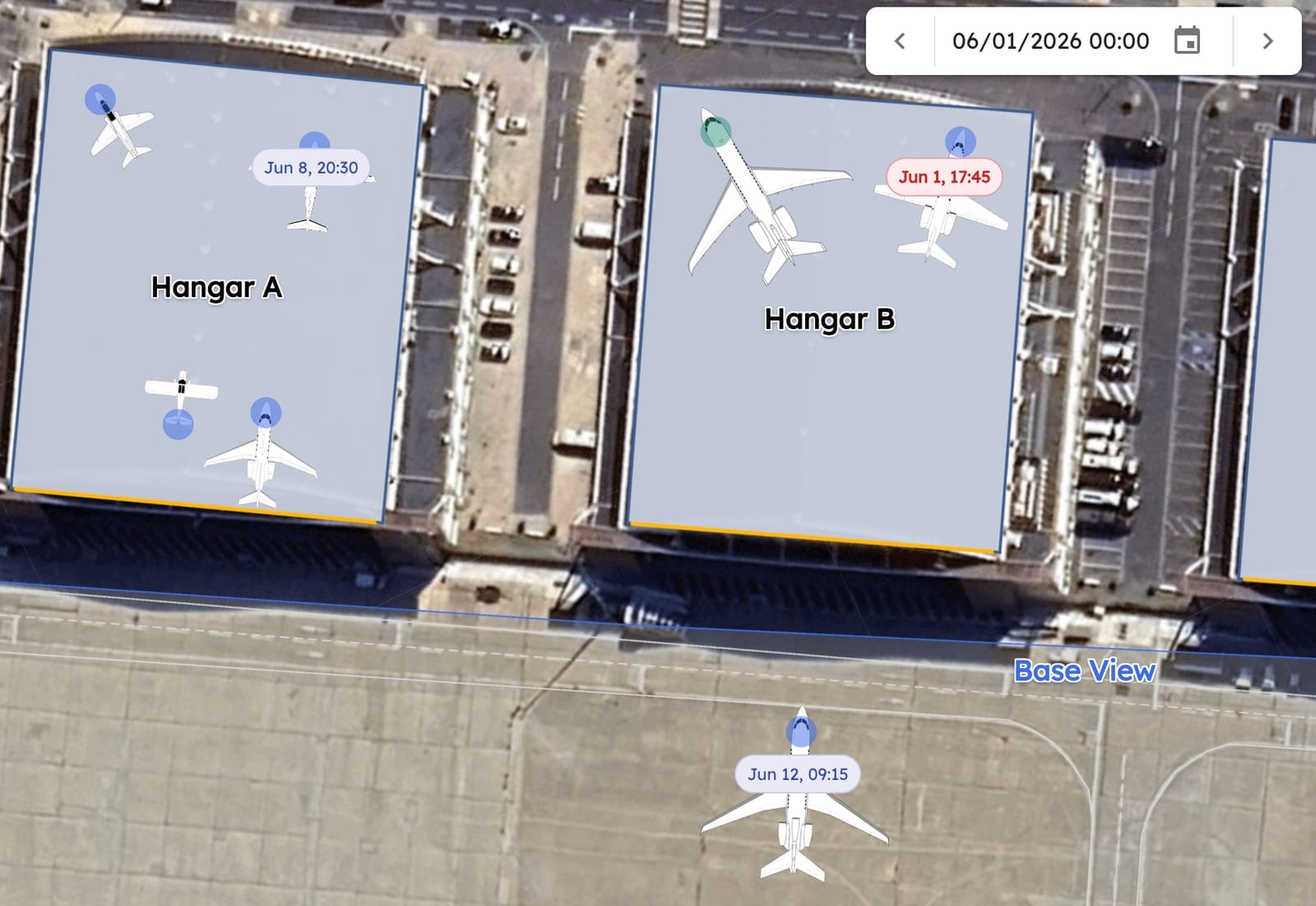
Now you can. Base View has a Live Mode, and it's exactly what it sounds like. Aircraft positions update in real time as your team places and moves them. Open the map at the start of a shift and it's already current. No refresh, no "let me check the hangar card to be sure."
Live Mode. Real-time positions across every hangar and ramp, on one map.
Drag an aircraft and it moves, live, and the assignment updates everywhere it shows up: schedule, hangar view, mobile. Need to clear one off the board? Select it and hit Delete. The gestures you already know from the single-hangar view all work here, just at field scale.
The piece people keep asking for: a Holding Area. Unassigned aircraft, the ones that just came in off a FlightBridge trip or got bumped from a layout, collect in a side panel instead of disappearing into a list somewhere. Click one and drop it onto a spot, and it's assigned. No hunting, no separate screen.
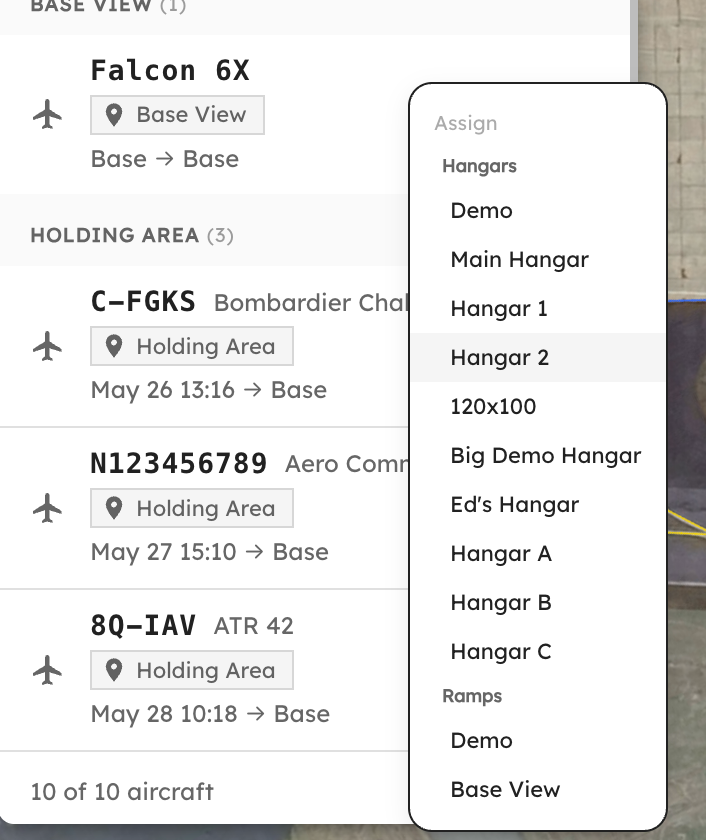
The Holding Area. Unassigned aircraft stack up on the left; hit Assign and drop one straight onto any hangar or ramp.
And because the busy days are the ones you actually have to plan for, there's a date picker built in. Scrub forward to tomorrow, or next Tuesday, and lay out arrivals against your live positions before the jets are wheels-down. Ramps and aircraft stay visible at every zoom level now, so you can go from the whole campus down to a single ramp without anything dropping off the map.
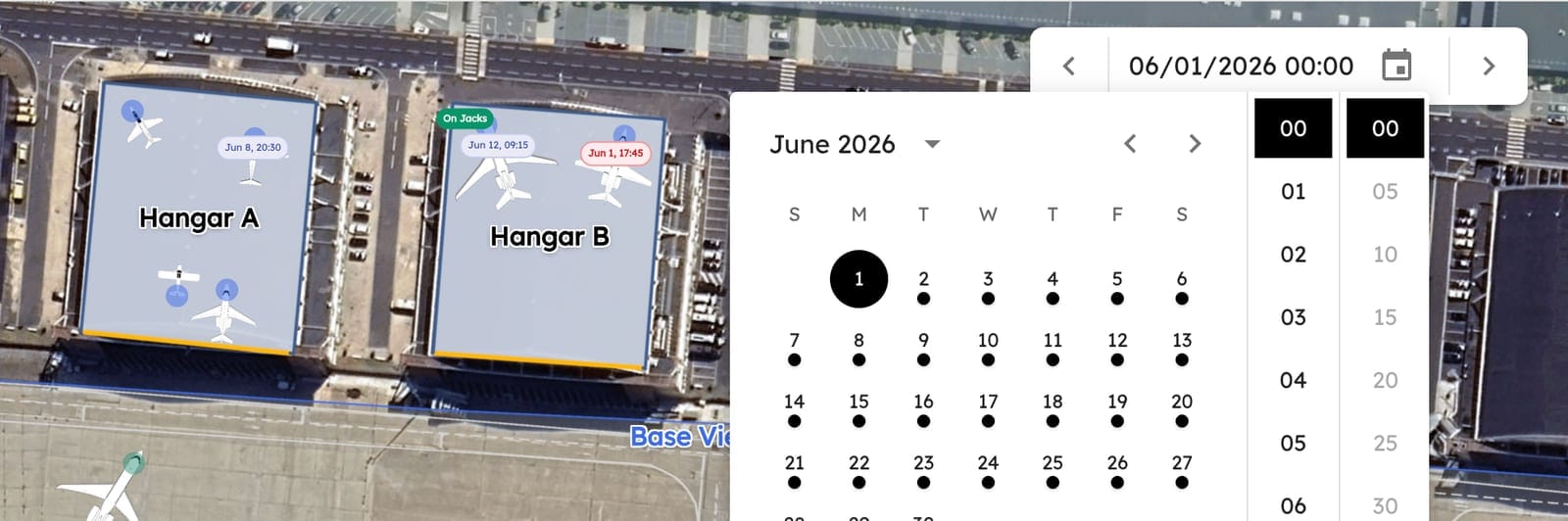
Plan tomorrow against today. Pick a date and time and the map shows you exactly where everything sits, without leaving the live view.
It's in the side nav, same place Base View has always been. Open it and flip on Live Mode.
Planning for the next generation of aircraft?
AirPlx includes 1,000+ aircraft models with verified dimensions. Stack your hangar before the aircraft arrives.
See AutoStack in actionNew Aircraft
Eleven airframes joined the library this month, our biggest batch in a while. As usual it's a grab bag: a Monaco-grade helicopter, a crop duster, a trijet you'll hear before you see, and a couple that only an MRO shop would ever request.

The C-130 in AirPlx, wings off. This is the top-down footprint your team actually parks against, and it changes completely once the wings come off. MRO shops don't store aircraft in flight configuration, so neither do we. Need a modified airframe (wings removed, fuselage only, engines pulled)? Just tell us. We'll build it.
The full lineup, in alphabetical order:
- Bearhawk Five. A roomy backcountry homebuilt built to haul people and gear into short strips.
- Boeing 727-200. Three tail-mounted engines and a built-in airstair. They don't make them like this anymore, literally.
- Bombardier CRJ 550. The 50-seater reborn as a roomy, premium-cabin regional jet.
- Bombardier Learjet 35/36 (fuselage only). One for the MRO crowd: all body, no wings.
- Cessna A188B AgTruck. A crop duster, because not everything in the hangar shows up in a glossy paint job.
- Embraer ERJ 135ER. The compact regional jet quietly doing a lot of the flying you never think about.
- Flying Legend Tucano R. A scaled warbird replica that looks meaner than it is.
- Leonardo/Agusta AW169. A sleek medium twin helicopter, for when the ramp gets a little Monaco.
- Lockheed C-130 (wings removed). A Hercules mid-surgery, for the MRO shops storing one in pieces.
- Porto Aviation Risen SV. A carbon-fiber light sport that's faster than it has any right to be.
- Vulcanair V1.0. An Italian piston single you've probably never parked. Until now.
Don't see one you fly? Funny you should ask.
Need an Aircraft We Don't Have? Just Ask.
You request an airframe we haven't built yet. It happens a few times a month, and historically it kicked off a quiet round of back-and-forth: we'd research the aircraft, find dimensions, track down reference photos, then build the artwork.
In May we automated the front half of that. The moment you submit a request, AirPlx researches the aircraft on its own, pulling specs, dimensions, ICAO data, and reference imagery, then hands our team a fully prepped brief instead of a blank form. Less waiting on you to dig up a spec sheet, less waiting on us to start. Same careful build at the end, just a shorter runway to get there.
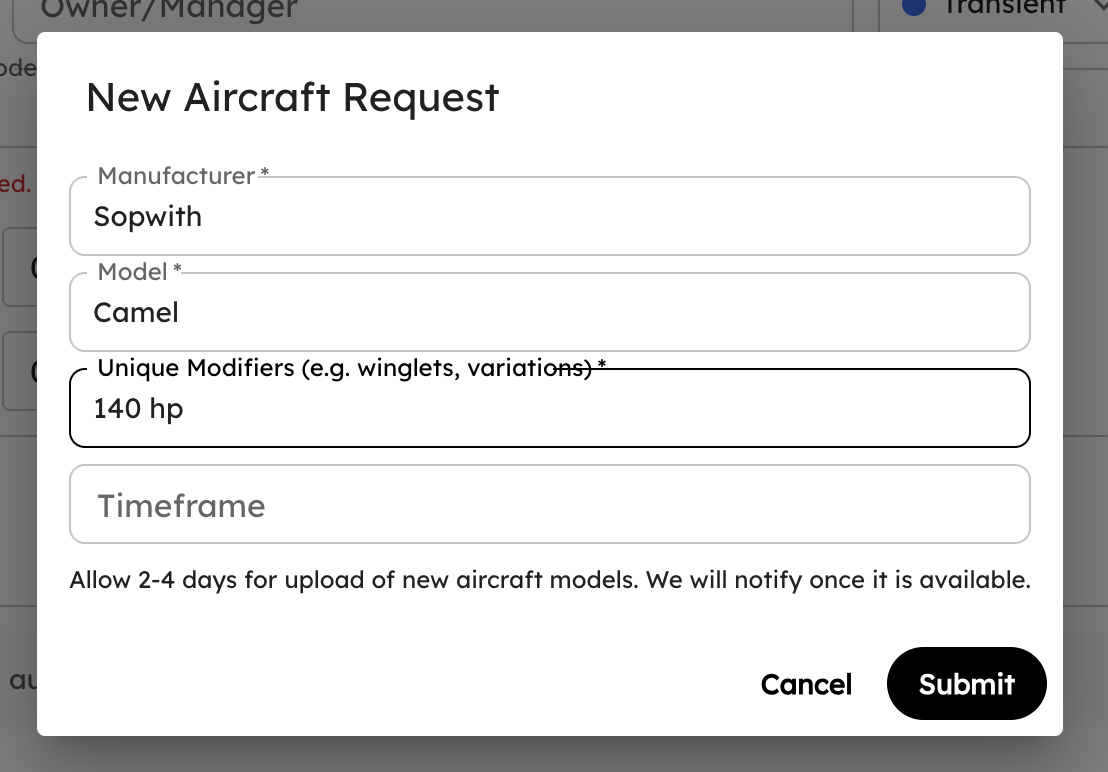
Manufacturer, model, any modifiers, and you're done. We do the research automatically and notify you when it's in, usually within a couple of days.
Small Stuff That Adds Up
None of these will make a press release. All of them save you a few seconds, a few times a day.
- Prior Transients sorts by recency. When you're adding an aircraft to a hangar, the Prior Transients tab now puts the most recently hangared aircraft on top, not whatever sorts first alphabetically. The "Last Hangared" column finally matches the order you're reading.
- "N/A" for missing tail numbers. Aircraft with no tail number used to render their model name twice. Now they just say N/A. Cleaner labels, less confusion.
- Faster image loads. Announcement and ramp-settings images moved off inline data and onto proper storage, trimming over a megabyte off some page loads. Settings opens quicker, especially on the ramp Wi-Fi.
Bug Fixes
- More resilient FlightBridge sync. We improved how the importer handles an unusual booking so the rest of your trips always come through cleanly, even when one record is malformed.
- Junk bookings stay out of Pending Tenants. Concierge entries like car washes and fuel deliveries sometimes arrive with a customer surname where the tail number belongs. AirPlx now catches those before the registry lookup, so they stop cluttering your tenant list.
- Steadier Base View. We hardened the map against rare, unusual coordinate values so it stays smooth no matter what's in the feed.
- Various other stability fixes from customer reports. If you reported something and it's working now, thank you.
What's Next
The mobile app is still the big one, and it's still where most of our heads are pointed. More of the workflows your ramp crew runs on iPads and phones, less of the "go find a laptop to do this one thing." It's in the final app store approvals right now, so we're days away, not months. More to share very soon.
As always, the roadmap is shaped by what you tell us. Email us at hi@airplx.com.
Want to see these features in action? Schedule a quick demo or email us: hi@airplx.com